前回はWordのgrep検索をするプログラムを作成しましたが、今回はPDFをgrep検索するプログラムを作成してみました。
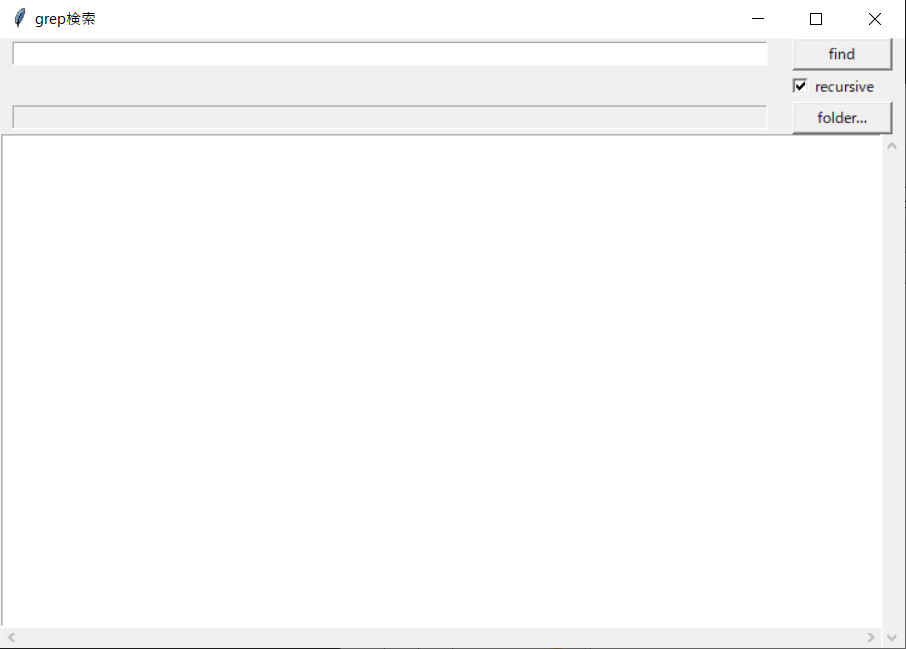
使い方も前回と同様で、検索するファイルの対象がdocxファイルからpdfファイルに変更されただけです。GUIの操作も前回と同じです。
使い方
前回と同様ですので、そちらを参照してください。
必要モジュール
以下のモジュールをインストールする必要があります。
|
1 |
pip install pdfminer.six |
このモジュールの詳しい内容は、以下のサイトの説明を参照してください。
https://www.shibutan-bloomers.com/python_library_pdfminer-six/2124/
ソースコード
|
1 2 3 4 5 6 7 8 9 10 11 12 13 14 15 16 17 18 19 20 21 22 23 24 25 26 27 28 29 30 31 32 33 34 35 36 37 38 39 40 41 42 43 44 45 46 47 48 49 50 51 52 53 54 55 56 57 58 59 60 61 62 63 64 65 66 67 68 69 70 71 72 73 74 75 76 77 78 79 80 81 82 83 84 85 86 87 88 89 90 91 92 93 94 95 96 97 98 99 100 101 102 103 104 105 106 107 108 109 110 111 112 113 114 115 116 117 118 119 120 121 122 123 124 125 126 127 128 129 130 131 132 133 134 135 136 137 138 139 140 141 142 143 144 145 146 147 148 149 150 151 152 153 154 155 156 157 158 159 160 161 162 163 164 165 166 167 168 169 170 171 172 173 174 175 176 177 178 179 180 181 182 183 184 185 186 187 188 189 190 191 192 193 194 195 196 197 198 199 200 201 202 203 204 205 206 207 208 209 210 211 212 213 214 215 216 217 218 219 220 221 222 223 224 225 226 227 228 |
from pdfminer.pdfinterp import PDFResourceManager, PDFPageInterpreter from pdfminer.converter import TextConverter from pdfminer.layout import LAParams from pdfminer.pdfpage import PDFPage from io import StringIO import os import re import tkinter as tk import tkinter.filedialog as fd from tkinter import messagebox import subprocess from glob import glob ############################################################################### # # 検索結果を保持するデータクラス # ############################################################################### class Result(): def __init__(self): self.dir_name = "" self.filename = "" self.line = -1 self.sentence = "" ############################################################################### # # メインのGUIクラス # ############################################################################### class GUI_grep(): #-------------------------------------------------------------------------# # メインループ #-------------------------------------------------------------------------# def run(self): self.root.mainloop() #-------------------------------------------------------------------------# # 初期化 #-------------------------------------------------------------------------# def __init__(self): self.dirpath = "" self.root = tk.Tk() self.root.title(u"grep検索") self.frame1 = tk.Frame() self.frame1.pack() self.kw_entry = tk.Entry(self.frame1, width=100) self.kw_entry.pack(fill='x', padx=10, side='left') self.button_grep = tk.Button(self.frame1, text="find", width=10, command=self.process_files) self.button_grep.pack(fill='x', padx=10, side='left') self.frame2 = tk.Frame() self.frame2.pack(anchor=tk.E, padx=20) self.b_chk1 = tk.BooleanVar(value=True) self.chk_btn1 = tk.Checkbutton(self.frame2, variable=self.b_chk1, text='recursive') self.chk_btn1.pack() self.frame3 = tk.Frame() self.frame3.pack() self.dir_entry = tk.Entry(self.frame3, width=100) self.dir_entry.configure(state='readonly') self.dir_entry.pack(fill='x', padx=10, side='left') self.button_mov = tk.Button(self.frame3, text="folder...", width=10, command=self.set_directory) self.button_mov.pack(fill='x', padx=10, side='left') self.frame4 = tk.Frame() self.frame4.pack() self.text = tk.Text(self.frame4, width=100, height=30, wrap=tk.NONE) self.text.bind("<Double-1>", self.open_file) self.yscroll = tk.Scrollbar(self.frame4, orient=tk.VERTICAL, command=self.text.yview) self.yscroll.pack(side=tk.RIGHT, fill="y") self.xscroll = tk.Scrollbar(self.frame4, orient=tk.HORIZONTAL, command=self.text.xview) self.xscroll.pack(side=tk.BOTTOM, fill="x") self.text["yscrollcommand"] = self.yscroll.set self.text["xscrollcommand"] = self.xscroll.set self.text.pack(side='top') #-------------------------------------------------------------------------# # 検索結果をダブルクリックして、ファイルを開く処理 #-------------------------------------------------------------------------# def open_file(self, event): pos = self.text.index('insert') try: res = self.all_results[int(pos.split('.')[0])-1] prog_path = r"C:\Program Files (x86)\Adobe\Acrobat Reader DC\Reader\AcroRd32.exe" file_path = os.path.join(res.dir_name, res.filename) file_path = file_path.replace('/', '\\') command = f'"{prog_path}" "{file_path}"' subprocess.Popen(command, shell=False) except Exception as e: print(e) pass #-------------------------------------------------------------------------# # プログラムの終了処理 #-------------------------------------------------------------------------# def exit_program(self): self.root.quit() exit() #-------------------------------------------------------------------------# # ディレクトリ選択ダイアログ #-------------------------------------------------------------------------# def ask_input_directory(self): rt = tk.Tk() rt.withdraw() dir_name = fd.askdirectory(initialdir=os.getcwd(), title='フォルダの選択', mustexist=True) rt.destroy() return dir_name #-------------------------------------------------------------------------# # ディレクトリを設定する #-------------------------------------------------------------------------# def set_directory(self): self.dirpath = self.ask_input_directory() # キャンセルされた場合 if self.dirpath == '': return self.dir_entry.configure(state='normal') self.dir_entry.delete(0, tk.END) self.dir_entry.insert(tk.END, self.dirpath) self.dir_entry.configure(state='readonly') #-------------------------------------------------------------------------# # Grep検索する #-------------------------------------------------------------------------# def process_files(self): # ディレクトリが設定されていない場合 if self.dir_entry.get() == '': self.set_directory() if self.dirpath == '': self.dirpath == self.dir_entry.get() if self.dirpath == '': return # キーワード keyword = self.kw_entry.get() # 検索結果をクリアする self.text.delete("1.0", "end") if self.b_chk1.get() == True: all_files = glob(self.dirpath + "/**/*.pdf", recursive=True) else: all_files = glob(self.dirpath + "/*.pdf") self.all_results = [] for file in all_files: dir_name = os.path.dirname(file) filename = os.path.basename(file) rsrcmgr = PDFResourceManager() laparams = LAParams() laparams.detect_vertical = True outfp = StringIO() device = TextConverter(rsrcmgr, outfp, codec='utf-8', laparams=laparams) pdf = open(file, 'rb') interpreter = PDFPageInterpreter(rsrcmgr, device) for page in PDFPage.get_pages(pdf): interpreter.process_page(page) text =[outfp.getvalue()] pdf.close() device.close() outfp.close() for i in range(len(text)): try: lines = re.sub(r'\n+', '\n', text[i]) lines = lines.split('\n') for ii in range(len(lines)): m = re.search(keyword, lines[ii]) if m: res = Result() res.dir_name = dir_name res.filename = filename res.line = ii+1 res.sentence = lines[ii] self.all_results.append(res) except Exception as e: print(e) pass # 結果の表示 for i, res in enumerate(self.all_results): if i == len(self.all_results)-1: self.text.insert(tk.END, f"{res.filename} ({res.line}): {res.sentence}") else: self.text.insert(tk.END, f"{res.filename} ({res.line}): {res.sentence}\n") messagebox.showinfo("終了", "検索が終わりました。") ############################################################################### # # 以下、メイン処理 # ############################################################################### if __name__ == "__main__": app = GUI_grep() app.run() |
プログラムの簡単な説明
前回と違う部分だけ説明していきます。
|
96 97 98 99 100 101 102 103 104 105 106 107 108 109 110 |
#-------------------------------------------------------------------------# # 検索結果をダブルクリックして、ファイルを開く処理 #-------------------------------------------------------------------------# def open_file(self, event): pos = self.text.index('insert') try: res = self.all_results[int(pos.split('.')[0])-1] prog_path = r"C:\Program Files (x86)\Adobe\Acrobat Reader DC\Reader\AcroRd32.exe" file_path = os.path.join(res.dir_name, res.filename) file_path = file_path.replace('/', '\\') command = f'"{prog_path}" "{file_path}"' subprocess.Popen(command, shell=False) except Exception as e: print(e) pass |
検索結果をダブルクリックしたときにファイルを開く処理です。
103行目:PDFを開くアプリケーション(ここではAcrobat Reader)のパスは環境によって違うと思いますので、書き換えが必要です。
|
166 167 168 169 |
if self.b_chk1.get() == True: all_files = glob(self.dirpath + "/**/*.pdf", recursive=True) else: all_files = glob(self.dirpath + "/*.pdf") |
166~169行目:当然ながらglobで検索するファイルの拡張子は”pdf”になります。
|
171 172 173 174 175 176 177 178 179 180 181 182 183 184 185 186 187 188 189 190 191 192 193 194 195 196 197 198 199 200 201 202 203 204 205 206 207 |
self.all_results = [] for file in all_files: dir_name = os.path.dirname(file) filename = os.path.basename(file) rsrcmgr = PDFResourceManager() laparams = LAParams() laparams.detect_vertical = True outfp = StringIO() device = TextConverter(rsrcmgr, outfp, codec='utf-8', laparams=laparams) pdf = open(file, 'rb') interpreter = PDFPageInterpreter(rsrcmgr, device) for page in PDFPage.get_pages(pdf): interpreter.process_page(page) text =[outfp.getvalue()] pdf.close() device.close() outfp.close() for i in range(len(text)): try: lines = re.sub(r'\n+', '\n', text[i]) lines = lines.split('\n') for ii in range(len(lines)): m = re.search(keyword, lines[ii]) if m: res = Result() res.dir_name = dir_name res.filename = filename res.line = ii+1 res.sentence = lines[ii] self.all_results.append(res) except Exception as e: print(e) pass |
メインの検索処理の部分です。176~190行目で、StringIOオブジェクトのoutfpにPDFファイルに含まれるテキスト情報を取り出しています。あとは取り出したテキストを改行で区切って、正規表現で検索をかけています(192行目~207行目)。
- 投稿タグ
- プログラミング
