今日はPythonでMicrosoft Wordをgrep検索するプログラムを作ったので、それを紹介しようと思います。
Wordでいろいろな文章を作成する事がありますが、ファイルが多くなってくると「あの文章、どこに書いたんだっけ?」ということが起きてしまうと思います(少なくとも私はよくあります)。
私は普段、テキストエディタに秀丸というソフトウェアを使っていますが、秀丸には指定したフォルダに含まれている複数のテキストファイルからキーワード検索する機能が含まれています。この機能はgrep検索として知られているものです。
このgrep検索がWordファイルでできればとても便利になると思い、今回のプログラムを作った次第です。すでにWordをgrep検索できるソフトウェアはありますが、Pythonの勉強もかねて自分で作ってみました。
※Windowsで動かすことを前提にしたプログラムですので、ご注意ください。
使い方
プログラムを実行すると以下のような画面が開きます。
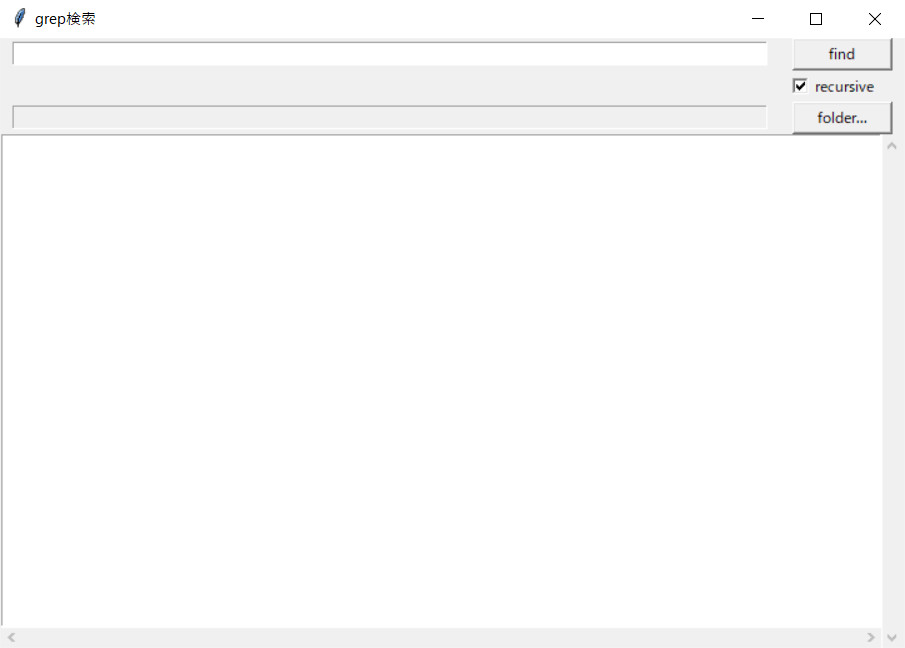
一番上に検索キーワードを入れるテキストボックスと、検索を実行する「find」ボタンがあります。検索には正規表現も使えます。また、その下にある「recursive」にチェックを入れると、サブフォルダに含まれるファイルも検索します。
「folder…」ボタンを押すと、検索するフォルダを指定するためのダイアログが開きます。検索するフォルダが指定する前に「find」ボタンを押しても、同様にフォルダを指定するダイアログが開きます。
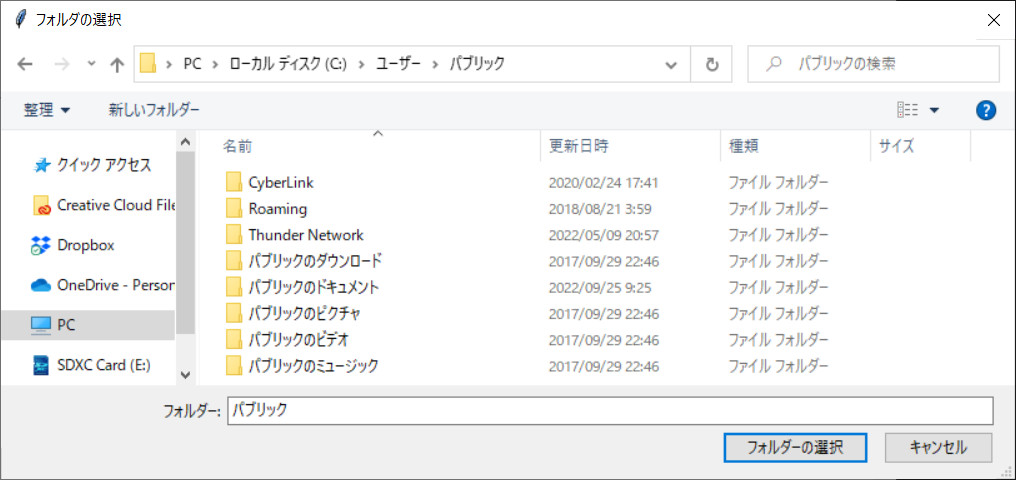
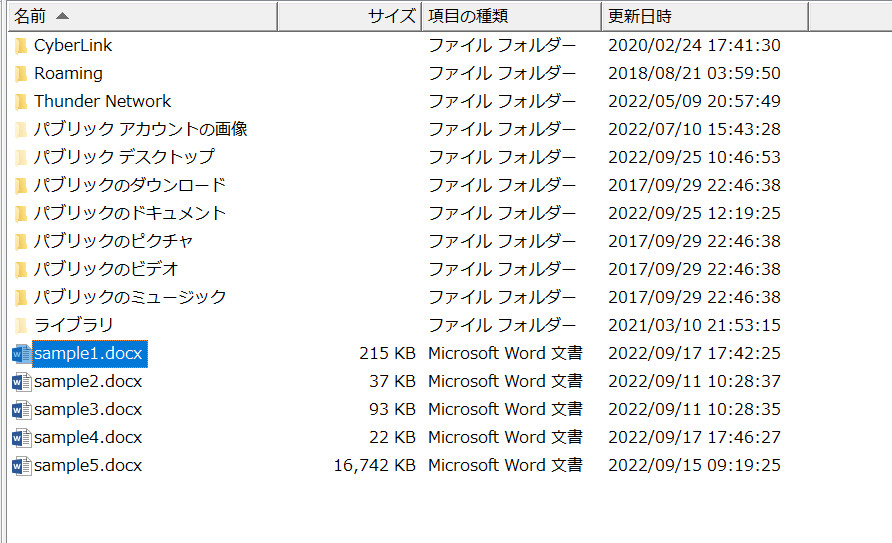
今回は以下のように5つのdocxファイルがあるフォルダを指定して、「results」という文字が含まれるファイルを検索してみました。
検索結果が、下の部分に表示されます。
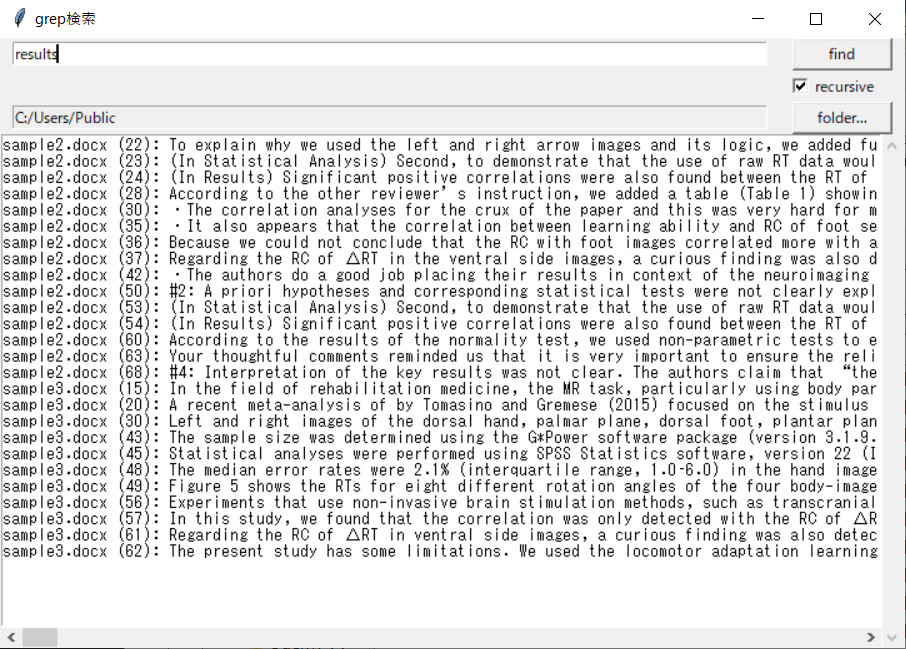
結果をダブルクリックすると、そのファイルがWordで開くようになっています。
必要モジュール
docx2txtモジュールをインストールする必要があります。
|
1 |
pip install docx2txt |
ソースコード
プログラム全体のソースコードは以下の通りです。
|
1 2 3 4 5 6 7 8 9 10 11 12 13 14 15 16 17 18 19 20 21 22 23 24 25 26 27 28 29 30 31 32 33 34 35 36 37 38 39 40 41 42 43 44 45 46 47 48 49 50 51 52 53 54 55 56 57 58 59 60 61 62 63 64 65 66 67 68 69 70 71 72 73 74 75 76 77 78 79 80 81 82 83 84 85 86 87 88 89 90 91 92 93 94 95 96 97 98 99 100 101 102 103 104 105 106 107 108 109 110 111 112 113 114 115 116 117 118 119 120 121 122 123 124 125 126 127 128 129 130 131 132 133 134 135 136 137 138 139 140 141 142 143 144 145 146 147 148 149 150 151 152 153 154 155 156 157 158 159 160 161 162 163 164 165 166 167 168 169 170 171 172 173 174 175 176 177 178 179 180 181 182 183 184 185 186 187 188 189 190 191 192 193 194 195 196 197 198 199 200 201 202 203 204 205 206 |
import os import re import tkinter as tk import tkinter.filedialog as fd from tkinter import messagebox import subprocess from glob import glob import docx2txt ############################################################################### # # 検索結果を保持するデータクラス # ############################################################################### class Result(): def __init__(self): self.dir_name = "" self.filename = "" self.line = -1 self.sentence = "" ############################################################################### # # メインのGUIクラス # ############################################################################### class GUI_grep(): #-------------------------------------------------------------------------# # メインループ #-------------------------------------------------------------------------# def run(self): self.root.mainloop() #-------------------------------------------------------------------------# # 初期化 #-------------------------------------------------------------------------# def __init__(self): self.dirpath = "" self.root = tk.Tk() self.root.title(u"grep検索") self.frame1 = tk.Frame() self.frame1.pack() self.kw_entry = tk.Entry(self.frame1, width=100) self.kw_entry.pack(fill='x', padx=10, side='left') self.button_grep = tk.Button(self.frame1, text="find", width=10, command=self.process_files) self.button_grep.pack(fill='x', padx=10, side='left') self.frame2 = tk.Frame() self.frame2.pack(anchor=tk.E, padx=20) self.b_chk1 = tk.BooleanVar(value=True) self.chk_btn1 = tk.Checkbutton(self.frame2, variable=self.b_chk1, text='recursive') self.chk_btn1.pack() self.frame3 = tk.Frame() self.frame3.pack() self.dir_entry = tk.Entry(self.frame3, width=100) self.dir_entry.configure(state='readonly') self.dir_entry.pack(fill='x', padx=10, side='left') self.button_mov = tk.Button(self.frame3, text="folder...", width=10, command=self.set_directory) self.button_mov.pack(fill='x', padx=10, side='left') self.frame4 = tk.Frame() self.frame4.pack() self.text = tk.Text(self.frame4, width=100, height=30, wrap=tk.NONE) self.text.bind("<Double-1>", self.open_file) self.yscroll = tk.Scrollbar(self.frame4, orient=tk.VERTICAL, command=self.text.yview) self.yscroll.pack(side=tk.RIGHT, fill="y") self.xscroll = tk.Scrollbar(self.frame4, orient=tk.HORIZONTAL, command=self.text.xview) self.xscroll.pack(side=tk.BOTTOM, fill="x") self.text["yscrollcommand"] = self.yscroll.set self.text["xscrollcommand"] = self.xscroll.set self.text.pack(side='top') #-------------------------------------------------------------------------# # 検索結果をダブルクリックして、ファイルを開く処理 #-------------------------------------------------------------------------# def open_file(self, event): pos = self.text.index('insert') try: res = self.all_results[int(pos.split('.')[0])-1] prog_path = r"C:\Program Files\Microsoft Office\Office16\WINWORD.EXE" file_path = os.path.join(res.dir_name, res.filename) file_path = file_path.replace('/', '\\') command = f'"{prog_path}" "{file_path}"' subprocess.Popen(command, shell=False) except Exception as e: print(e) pass #-------------------------------------------------------------------------# # プログラムの終了処理 #-------------------------------------------------------------------------# def exit_program(self): self.root.quit() exit() #-------------------------------------------------------------------------# # ディレクトリ選択ダイアログ #-------------------------------------------------------------------------# def ask_input_directory(self): rt = tk.Tk() rt.withdraw() dir_name = fd.askdirectory(initialdir=os.getcwd(), title='フォルダの選択', mustexist=True) rt.destroy() return dir_name #-------------------------------------------------------------------------# # ディレクトリを設定する #-------------------------------------------------------------------------# def set_directory(self): self.dirpath = self.ask_input_directory() # キャンセルされた場合 if self.dirpath == '': return self.dir_entry.configure(state='normal') self.dir_entry.delete(0, tk.END) self.dir_entry.insert(tk.END, self.dirpath) self.dir_entry.configure(state='readonly') #-------------------------------------------------------------------------# # Grep検索する #-------------------------------------------------------------------------# def process_files(self): # ディレクトリが設定されていない場合 if self.dir_entry.get() == '': self.set_directory() if self.dirpath == '': self.dirpath == self.dir_entry.get() if self.dirpath == '': return # キーワード keyword = self.kw_entry.get() # 検索結果をクリアする self.text.delete("1.0", "end") self.all_results = [] if self.b_chk1.get() == True: all_files = glob(self.dirpath + "/**/*.docx", recursive=True) else: all_files = glob(self.dirpath + "/*.docx") for file in all_files: dir_name = os.path.dirname(file) filename = os.path.basename(file) text = docx2txt.process(file) # 不要な改行を取り除く text = re.sub(r'\n+', '\n', text) lines = text.split('\n') for i in range(len(lines)): m = re.search(keyword, lines[i]) if m: res = Result() res.dir_name = dir_name res.filename = filename res.line = i res.sentence = lines[i] self.all_results.append(res) # 結果の表示 for i, res in enumerate(self.all_results): if i == len(self.all_results)-1: self.text.insert(tk.END, f"{res.filename} ({res.line}): {res.sentence}") else: self.text.insert(tk.END, f"{res.filename} ({res.line}): {res.sentence}\n") messagebox.showinfo("終了", "検索が終わりました。") ############################################################################### # # 以下、メイン処理 # ############################################################################### if __name__ == "__main__": app = GUI_grep() app.run() |
プログラムの簡単な説明
細かい説明は省き、メインとなる処理の部分だけ説明していきます。
|
92 93 94 95 96 97 98 99 100 101 102 103 104 105 106 |
#-------------------------------------------------------------------------# # 検索結果をダブルクリックして、ファイルを開く処理 #-------------------------------------------------------------------------# def open_file(self, event): pos = self.text.index('insert') try: res = self.all_results[int(pos.split('.')[0])-1] prog_path = r"C:\Program Files\Microsoft Office\Office16\WINWORD.EXE" file_path = os.path.join(res.dir_name, res.filename) file_path = file_path.replace('/', '\\') command = f'"{prog_path}" "{file_path}"' subprocess.Popen(command, shell=False) except Exception as e: print(e) pass |
検索結果をダブルクリックしたときにファイルを開く処理です。特に99行目にあるWordプログラムのパスは環境によって違うと思いますので、書き換えが必要です。また101行目の処理ですが、Windowsのパスは「\(円マーク・バックスラッシュ)」が使われるので、「/(スラッシュ)」を置換しています。
|
172 173 174 175 176 177 178 179 180 181 182 183 184 185 |
text = docx2txt.process(file) # 不要な改行を取り除く text = re.sub(r'\n+', '\n', text) lines = text.split('\n') for i in range(len(lines)): m = re.search(keyword, lines[i]) if m: res = Result() res.dir_name = dir_name res.filename = filename res.line = i res.sentence = lines[i] self.all_results.append(res) |
メインの検索処理の部分です。docx2txtモジュールを使って、Wordファイルからテキスト情報を抜き出しています。175~176行目では、re.subメソッドで改行が2つ以上続く部分を1つの改行にし、splitメソッドで1文ごとに分割しています。分割された1文ごとに正規表現で検索し、一致する部分があれば、その分をResultクラスの保存しておきます。
|
187 188 189 190 191 192 |
# 結果の表示 for i, res in enumerate(self.all_results): if i == len(self.all_results)-1: self.text.insert(tk.END, f"{res.filename} ({res.line}): {res.sentence}") else: self.text.insert(tk.END, f"{res.filename} ({res.line}): {res.sentence}\n") |
最後にResultsのリストをテキストエリアに表示しています。
- 投稿タグ
- プログラミング
